
ContrastGuard
Ship interfaces everyone can read: proof, fix, and simulate in one panel. Free to install; Pro is $4.99/month.
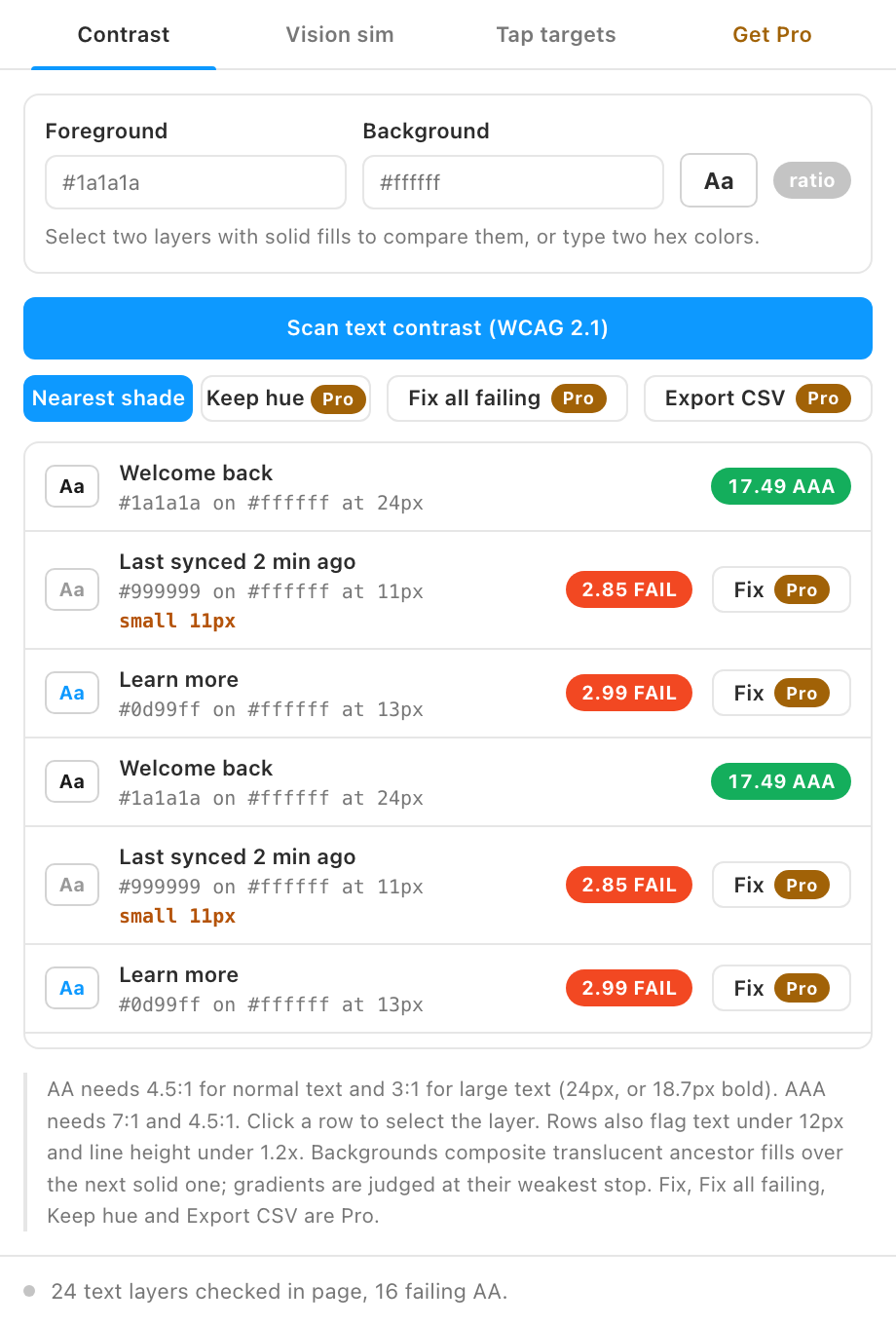
One in twelve men sees color differently, and low-contrast text fails real users long before it fails an audit. ContrastGuard scans your file the way WCAG measures it.
Free vs Pro
- Name
Free, forever- Type
- no account needed
- Description
The WCAG 2.1 contrast scan with AA and AAA verdicts, a live pair check for two selected layers or any two colors, typography flags, the color-vision simulator, and the tap-target audit.
- Name
Pro- Type
- $4.99/month
- Description
One-click fixes, fix all failing layers at once, a hue-preserving fix mode, and CSV export of the results.
Finding and previewing every problem is free; fixing them in one click and exporting the evidence is Pro. Buy from the plugin's Get Pro tab, paste the license key that arrives by email, and the locked features unlock on up to 3 devices. See Pricing for how subscriptions, devices and cancelling work.
What it does
- WCAG 2.1 contrast scan. Every text layer checked against its effective background, including translucent and gradient fills, with AA and AAA verdicts per layer and a flag for text under 12 px.
- Pair check. Select two layers, or type two colors, and watch the ratio live.
- One-click fixes (Pro). A failing color is nudged to the nearest passing shade, keeping its hue when possible, and applied back to the layer. Fix all failing rows at once.
- Large-text rules built in. The 3:1 exception for 24 px (or 18.7 px bold) text is applied automatically per text segment.
- Color-blindness simulation. Protanopia, deuteranopia, tritanopia, and achromatopsia previews of any frame.
- Tap-target audit. Every layer with a prototype interaction checked against WCAG 2.2 (24 px) and platform (44 px) minimums.
How to use it
- Scan. Select frames (or nothing for the whole page) and run the contrast scan. Green passes AAA, olive passes AA, red fails.
- Fix (Pro). Failing rows show a Fix button that searches for the closest color clearing the required ratio.
- Simulate. Select one frame and render it through the four vision simulations before sign-off.
Guides
- Quickstart: install and get your first result in two minutes.
- Feature guide: every control explained, and the rules the plugin follows.
- Pro features: what Pro unlocks and how the gate works.
- Troubleshooting: what to check when a result looks wrong.
Install
Figma desktop app
> Plugins > Development > Import plugin from manifest...
> select contrast-guard/manifest.json
FAQ
How is the background detected?
The nearest ancestor with a solid fill. Overlapping siblings are not evaluated, so treat unusual layouts as a hint to check manually.
AA or AAA?
AA (4.5:1, or 3:1 for large text) is the legal bar in most jurisdictions. AAA is a stretch goal for body text.