
DeckPort
Your frames become a real PowerPoint file, not screenshots in a folder. Free to install; Pro is $4.99/month.
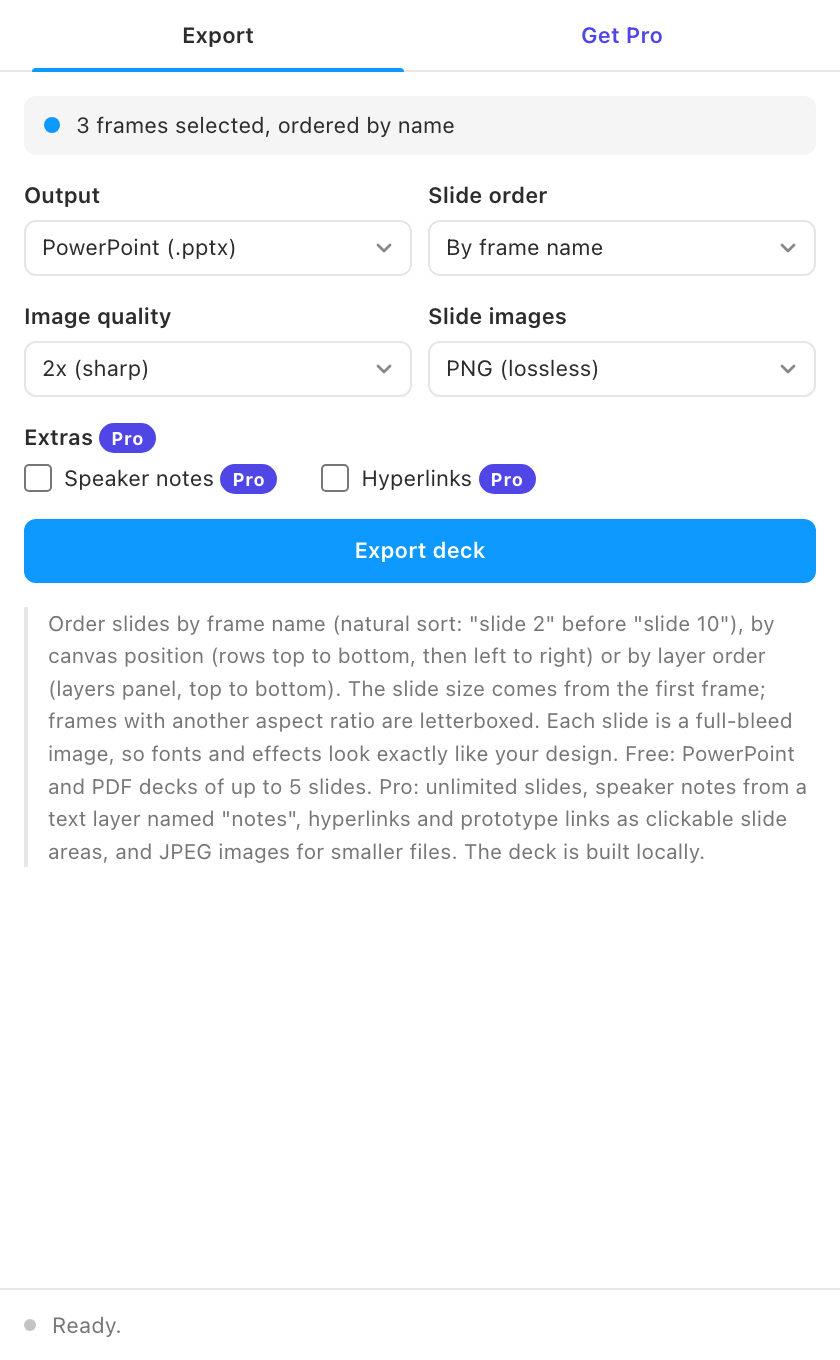
Clients ask for decks in PowerPoint. DeckPort builds a genuine .pptx package from your frames, plus a PDF deck when that is all you need.
Free vs Pro
- Name
Free, forever- Type
- no account needed
- Description
PowerPoint (.pptx) and PDF export for decks of up to 5 slides, slide order by frame name, canvas position or layer order, letterboxing for mixed aspect ratios, and 1x to 3x image quality.
- Name
Pro- Type
- $4.99/month
- Description
Unlimited slides, speaker notes from a layer named "notes", clickable hyperlinks, and JPEG slides with a quality slider.
The free PPTX is the demo: open it in PowerPoint before you pay a cent. Buy from the plugin's Get Pro tab, paste the license key that arrives by email, and the locked features unlock on up to 3 devices. See Pricing for how subscriptions, devices and cancelling work.
What it does
- Real .pptx output. A complete OOXML package: presentation, master, layout, theme, and one full-bleed slide per frame.
- PDF decks too. The same frames as a compact multi-page PDF, in one click.
- Slide order your way. By frame name (natural sort, so "slide 2" comes before "slide 10"), by canvas position, or by layer order.
- Speaker notes and links (Pro). Text in a layer named "notes" becomes presenter notes; prototype jumps and URL links stay clickable.
- Faithful by construction. Slides are rendered images of your frames: every font, shadow, and gradient survives untouched.
- Slide size from your design. The deck adopts your first frame's aspect ratio at standard 16:9 dimensions.
How to use it
- Name your frames. Call them slide 1, slide 2, and so on, or any names that sort in the order you want.
- Choose the output. PowerPoint, PDF, or both. Decks over 5 slides need Pro. Pick 2x quality for typical use; 3x for large screens.
- Open anywhere. The .pptx opens in PowerPoint, Keynote, and Google Slides. Reorder or delete slides there like any deck.
Guides
- Quickstart: install and get your first result in two minutes.
- Feature guide: every control explained, and the rules the plugin follows.
- Pro features: what Pro unlocks and how the gate works.
- Troubleshooting: what to check when a result looks wrong.
Install
Figma desktop app
> Plugins > Development > Import plugin from manifest...
> select deck-port/manifest.json
FAQ
Can I edit the text in PowerPoint?
No. Each slide is a full-slide image on purpose: perfect visual fidelity beats broken text conversion. Edit in Figma and re-export in seconds.
Why is my file big?
Slide images at 3x are large. Use 2x for most decks, or export the PDF which compresses better.