
TidyLint
Find every fill, stroke, text layer and effect that is off your design system, bind it to the nearest local style or variable in one click, and clean out the styles nobody uses. Free to install; Pro is $15 one-time.
TidyLint is in final testing and will be on the Figma Community soon. This page documents the first release.
Guides
- Quickstart: run your first lint and fix your first layer in two minutes.
- Feature guide: every rule, every fix and the cleanup report explained.
- Pro features: what Pro unlocks and how the gate works.
- Troubleshooting: what to check when a result looks wrong.
Free vs Pro
- Name
Free, forever- Type
- no account needed
- Description
Lint the selection or the current page with all ten rules, select and zoom to every offender, fix layers one at a time, and see the full cleanup report of unused styles, unused variables, duplicate styles and hidden layers.
- Name
Pro- Type
- $15 one-time
- Description
Whole-file scans across every page, Fix all in a rule group, CSV report export, and the cleanup actions: delete unused styles, variables and hidden layers, and merge duplicate styles.
Pro is a one-time purchase with no subscription. Buy it from the plugin's Get Pro tab, paste the license key that arrives by email, and Pro unlocks on up to 3 devices.
What it does
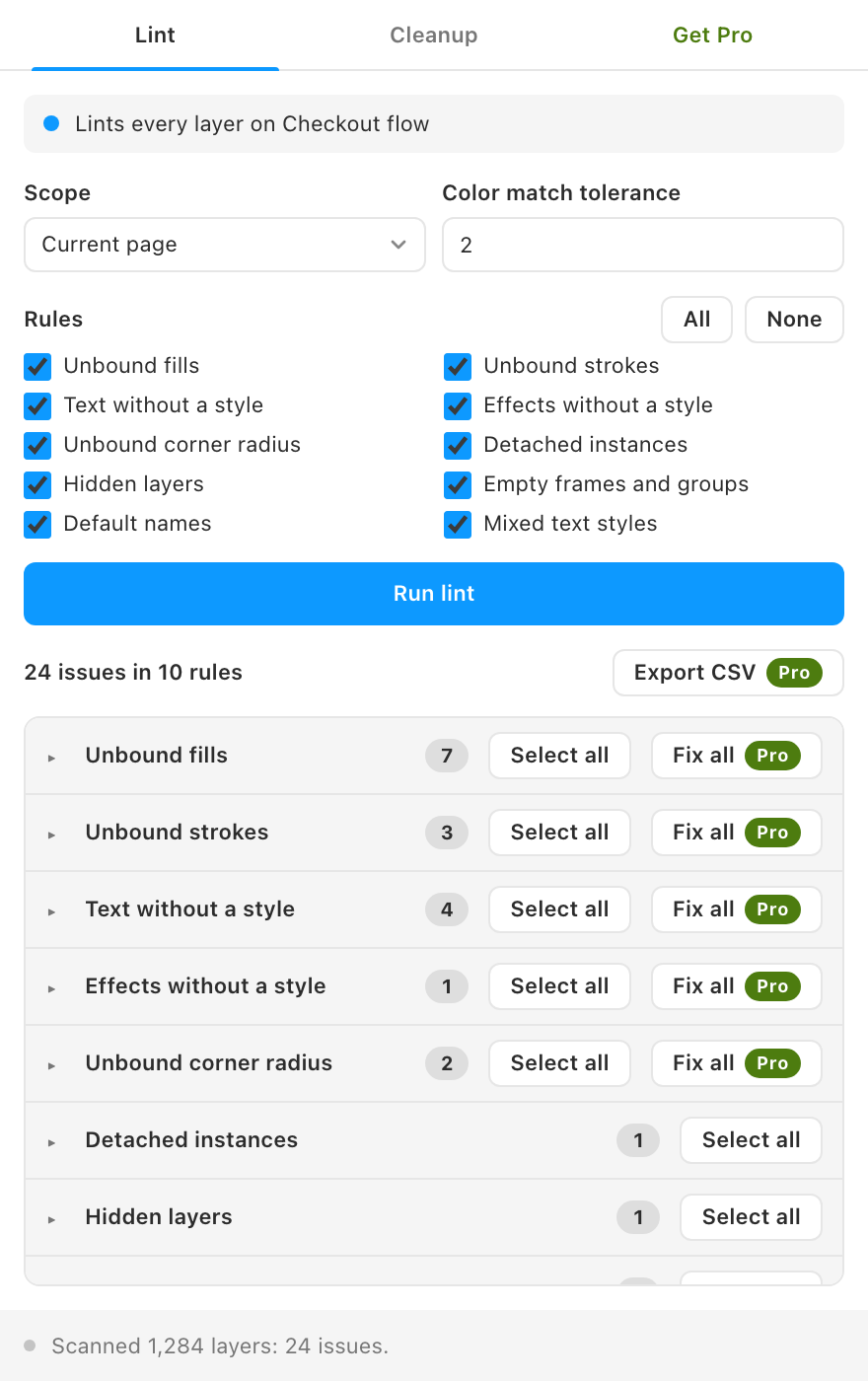
- Ten lint rules, each with a toggle. Unbound fills and strokes, text without a text style, effects without an effect style, unbound corner radius, detached instances, hidden layers, empty frames and groups, default names like "Frame 123", and mixed text styles in one layer.
- Results grouped by rule. Each group shows a count. Click a row to select and zoom to the layer, or select every layer in a group at once.
- Fixes that use what you already have. A fill or stroke binds to the nearest local paint style or color variable, measured in OKLab within a tolerance you set. Text gets the local text style with the same family, size and weight. Effects get the effect style with identical effects. A corner radius binds to a number variable with the same value.
- Cleanup across the whole file. Unused local paint, text, effect and grid styles, unused local variables, styles with identical values, and hidden layers.
- Never freezes Figma. Large scans walk the file in chunks, show progress and can be cancelled.
- Runs locally. The only network request is the license-key check. Your design data never leaves Figma.
How to use it
- Pick a scope. Selection or current page are free; all pages is Pro.
- Choose the rules you care about and click Run lint.
- Work through the groups. Click a row to jump to the layer, click Fix to bind it, and press Cmd/Ctrl + Z if you change your mind.
- Open the Cleanup tab and click Find unused and duplicates to see what can go.
FAQ
Does TidyLint create styles or variables?
No. It only binds layers to the local styles and variables already in the file. If nothing is close enough, the layer stays as it is and the status bar says why.
Does it lint inside instances?
No. Layers inside an instance belong to their main component, so TidyLint lints the main component instead and skips instance internals.
Can I undo a fix?
Yes. Every fix, merge and delete is an ordinary Figma edit, so Cmd/Ctrl + Z undoes it.
Does it work with library styles?
Fixes bind to local styles and variables only. Layers already bound to a library style or variable count as bound and are not flagged.